


Bose
3.517.96K Reviews
App Specs
- Version
- Varies with Device
- Updated On
- License
- Free
- Downloads
- 10,000,000+
- Developer
- Bose Corporation
- Categories
- Music & Audio
- Platform
- Android, iOS
Screenshots
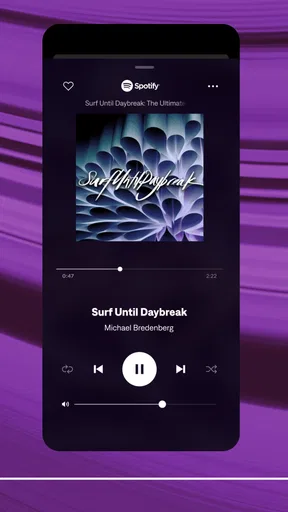
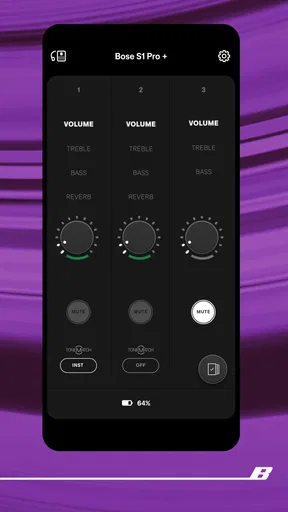
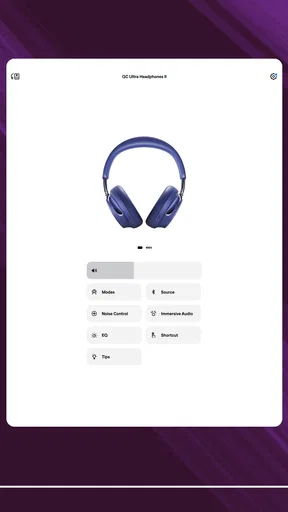
 Analysis by AppCompare
If you're an audiophile like me, you know the struggle of finding the perfect audio app that complements your Bose gear. Well, look no further because the Bose Music App might just be the answer to your prayers. I decided to dive deep into this app to see if it really lives up to the hype. Spoiler alert: it does, and then some!
What a control app is really for
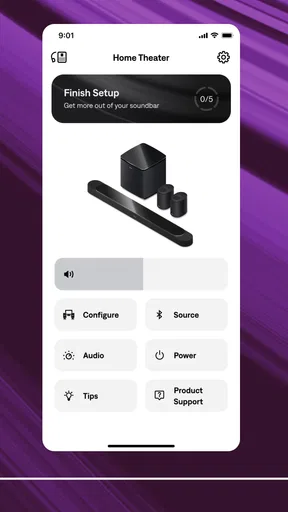
The useful idea behind this app is not that it replaces every music service on your phone. I see it as a control point for compatible Bose products: a place to manage the listening hardware rather than a general-purpose library for every speaker and headphone brand. That distinction matters. If your home already includes Bose equipment, one focused place to reach its controls can be more practical than moving between separate device menus. If you do not own Bose products, there is little reason to install it just to play music.
Bose Corporation makes the app, which sits in the music-and-audio category and is free to download. Its audience rating is 4.3 from around 161,000 ratings, and it has passed 10 million installs. Those figures suggest that it has found a substantial audience among Bose owners, but popularity alone does not make it the right choice for every listener. I would judge it by a simpler question: does it make the particular Bose devices you use easier to control?
Keeping device control separate from music choice
One useful way to think about the app is as the layer between you and your hardware. Your music habits may involve a streaming service, saved tracks, podcasts, or audio from another source; the app’s value is in helping you interact with Bose products. That separation can make a setup feel less confusing, especially if you are used to choosing music in one place and adjusting the listening device somewhere else.
It also sets a fair expectation before you download it. I would not choose this app as a replacement for a music player or streaming subscription. I would choose it because I own compatible Bose gear and want its controls gathered in a Bose-focused app. For listeners who switch frequently between brands, a phone’s built-in Bluetooth controls may be enough for basic playback, while this app makes more sense when the Bose-specific control layer is part of the point.
The First Impressions
Right off the bat, the Bose Music App impresses with its sleek and intuitive design. Downloading and setting it up was a breeze, even for someone who's not particularly tech-savvy. The app is available for both Android and iOS, which is a big plus for versatility. The interface is clean, with easy navigation that makes you feel right at home.
How the controls fit into a routine
A control app is most valuable when it saves small decisions repeatedly, not when it looks impressive on a single visit. In a normal week, I might want the headphones for a call, a speaker for music while cooking, and a different listening setup later in the evening. Having one Bose-oriented place to move between products can reduce the mental clutter of remembering which setting belongs to which device.
Worth Reading Before You Choose

EA SPORTS FC Mobile 26 Is a Bigger Football Game, but It Takes Time

Flipboard Shows What News Apps Must Do Beyond the Feed

Switching to Android Auto Means Rethinking Your Driving Routine

Google Calendar Makes a Crowded Week Easier to Manage

Ludo King Makes the Most of the Minutes Between Plans

Baby Panda World Brings Quick Play to Modern Phones, but Its Game Library Feels Busy
For a realistic example, imagine starting a playlist while tidying the kitchen, then wanting to listen privately when someone else begins a video in the next room. The helpful part is having a dedicated route to the Bose equipment you intend to use, rather than treating the phone’s general audio controls as the whole experience. I would still check which device is currently active before changing playback; a quick glance can prevent the familiar annoyance of adjusting the wrong speaker or headphones.
That small habit is especially useful in a home with more than one Bose product. I would give each device a clear, recognizable name during setup if the app offers that option, and avoid leaving several nearly identical labels in the device list. The point is not cosmetic: when you are in a hurry, a distinctive name makes switching less error-prone. It is a practical way to keep a multi-device setup manageable without turning every listening session into a troubleshooting exercise.
Features That Stand Out
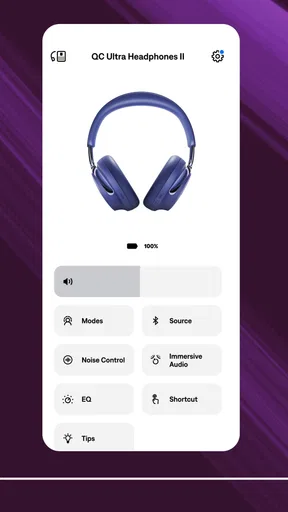
What really sets this app apart is the seamless integration with Bose products. Whether you’re using headphones, speakers, or soundbars, the app connects effortlessly. One of my favorite features is the adjustable equalizer. It allows you to tweak the sound settings to your liking, which means you can customize your listening experience like a pro.
I find an equalizer most useful when I make small, deliberate changes rather than chasing a dramatic effect. A modest adjustment can help a familiar playlist feel more comfortable in a particular room or with a particular kind of listening, while extreme boosts can make the overall balance less natural. I would change one thing at a time, listen to a track I know well, and keep a mental note of what improved. That makes it easier to return to a pleasing sound instead of losing track of which settings caused the difference.
The trade-off is that tuning is personal, not an automatic fix. A setting that suits low-volume listening may not be the one I prefer when I turn things up, and music that sounds fuller on one device may not benefit from the same adjustment on another. I would treat the equalizer as a quick personal preference tool, not as a promise that every song or product can be made perfect with a slider.
The app also supports voice control through Alexa and Google Assistant. I mean, who doesn't love a bit of hands-free convenience? Just a simple command, and you can change tracks, adjust the volume, or even check the weather. Talk about making life easier!
Voice control is most compelling when reaching for a phone would interrupt what I am doing: cooking, tidying, or carrying something across the room. It is less useful when I am already holding the phone or want to make a precise adjustment. I would also think about the room and the people in it before relying on spoken commands; in a quiet shared space, a tap can be less disruptive. That makes voice a convenience to use selectively rather than the only way I expect to control audio.
Performance and Usability
Performance-wise, the Bose Music App delivers consistently. I didn’t experience any lag or crashes, which is often a concern with apps that have high data usage. The connection was stable, and I could move around my house without losing sound quality.
In day-to-day use, I would separate app responsiveness from the whole listening chain. An app can make device control feel straightforward, but the phone, the Bose product, and the connection between them still shape what happens. If a device does not appear or respond as expected, I would first confirm that I have selected the intended product and that it is ready to connect before assuming the app itself is at fault. This simple check is more useful than repeatedly tapping controls without knowing which part of the setup needs attention.
I would also keep expectations grounded when moving between rooms. Managing equipment from one app does not mean every device will behave like a single speaker or that sound automatically follows you. The benefit is organization and access to controls; the physical listening experience still depends on which product you choose and where you use it. That distinction helps avoid confusing a convenient interface with a whole-home audio system that does everything on its own.
For someone comparing options, the usual alternative is to rely on a phone’s basic Bluetooth menu or each product’s available controls. Those options can be perfectly adequate if you use one device and rarely adjust anything. A dedicated Bose app is more appealing when you own several Bose products or want access to Bose-specific settings such as the equalizer. A broader, brand-neutral audio app may suit a mixed collection better, but it may not offer the same focused relationship with Bose hardware.
Another practical question is whether the app is worth keeping installed if I only use one Bose product. I would keep it if I regularly adjust that product or want the controls the phone’s ordinary audio panel does not provide. If I simply connect once and leave everything at its default, the extra app may feel unnecessary. The decision comes down to how often those controls improve your routine, not to how many features you might explore once.
For privacy and comfort, I would use voice assistants only if they fit my habits and household. The app’s support for Alexa and Google Assistant can be handy, but nobody needs to build their entire listening routine around voice commands. If I prefer manual control, the app remains useful as a device-management option; if voice features are important to me, I would check that my preferred assistant and the Bose product I own work together as I expect before relying on them every day.
The app is rated for Everyone, so its stated age suitability is broad. That does not mean every household needs the same setup: parents may still prefer to decide which devices children can use and whether voice control belongs in shared spaces. The app itself is free, which makes trying it a low-cost decision, though the practical value depends on owning compatible Bose equipment. I would not download it expecting it to turn non-Bose speakers into Bose-controlled devices.
Its release date is September 19, 2018, and that history makes one piece of advice especially sensible: check that the app and the particular product you own still work together on your phone before building a routine around it. Compatibility can matter more than the app’s broad reputation. I would also keep both the app and the phone’s operating system up to date, then test the controls at home before depending on them during a busy moment.
Another small but useful workflow is to settle the basics when you have time. Connect and identify the Bose product you plan to use, try the controls you care about, and make any sound adjustment with a familiar track. Doing that before guests arrive or before you start a task is less frustrating than learning the interface while everyone is waiting for music. Once the setup is comfortable, the app can fade into the background, which is exactly what I want from a control tool.
There are clear cases where I would skip it. If I have no Bose hardware, it does not solve a problem I have. If I use a mix of brands and value one universal control method above Bose-specific settings, the phone’s standard controls or a service designed around that mixed setup may be a better fit. And if I never adjust my device after pairing it, I may prefer not to add another app to my home screen. Those are not flaws so much as limits on who gets meaningful value from it.
For a Bose owner who often moves between listening devices, the strongest reason to try the app is the chance to make routine control feel less scattered. For a single-device listener, the equalizer or voice assistant support may still matter, but only if those are controls they will actually use. I would start with one everyday task, such as switching to headphones for a call or adjusting a speaker before cooking, and see whether the app makes that action easier. If it does, it has earned its place; if not, the simplest control method is probably the right one.
Final Thoughts
In conclusion, the Bose Music App is a game-changer for anyone who owns Bose products. It’s not just an app; it’s an extension of your audio experience. With its user-friendly interface, robust features, and reliable performance, it transforms how you interact with your music. If you’re serious about your sound, then this app is a must-have. Go ahead and give it a try—you won’t be disappointed!
Pros
- Excellent sound quality enhances user experience.
- Intuitive interface for easy navigation.
- Seamless connectivity with multiple devices.
- Customizable sound settings for personalization.
- Robust build quality ensures durability.
Cons
- Premium price may deter budget users.
- Limited compatibility with older devices.
- App updates can be infrequent.
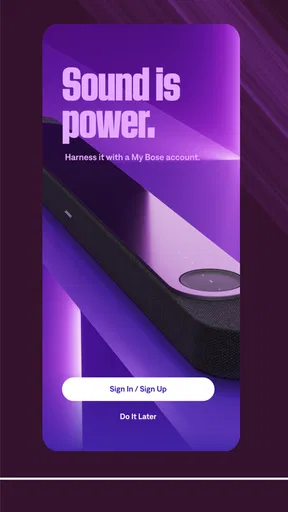
- Requires account setup for full features.
- Battery life could be improved.
FAQs for Bose
What features does the Bose app offer to enhance my audio experience?
The Bose app offers a variety of features to enhance your audio experience, including customizable sound settings, noise cancellation adjustments, and a personalized audio profile. It also supports firmware updates for your Bose devices, ensuring optimal performance and access to the latest features. Additionally, the app allows seamless device management and connection to multiple Bose products.
Is the Bose app compatible with all Bose audio devices?
The Bose app is compatible with most recent Bose audio devices, including headphones, speakers, and soundbars. However, some older models may not support all features offered by the app. It's recommended to check the compatibility list on the Bose website or within the app store description to ensure your specific device is supported.
How does the Bose app help with noise cancellation settings?
The Bose app provides an intuitive interface to control and customize noise cancellation settings for supported devices. Users can select different levels of noise cancellation to suit various environments, whether you need complete isolation or some ambient sound. This feature is particularly useful for creating the ideal listening experience in different settings, like commuting or working in a noisy office.
Can I use the Bose app to manage multiple devices simultaneously?
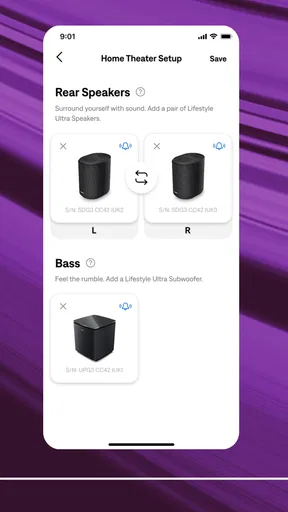
Yes, the Bose app allows you to manage multiple devices from a single interface. You can easily switch between different Bose products, customize settings for each, and manage device connections. This feature is particularly beneficial for users with multiple Bose products, as it streamlines control and enhances the overall user experience.
Are there any subscription fees or in-app purchases in the Bose app?
The Bose app is free to download and use, with no subscription fees or in-app purchases required. All features, including audio customization and device management, are available at no additional cost. This ensures that users can fully utilize the app's capabilities to enhance their audio experience without worrying about hidden charges.


